Swipe to explore the screenshot. Tap to open full size.
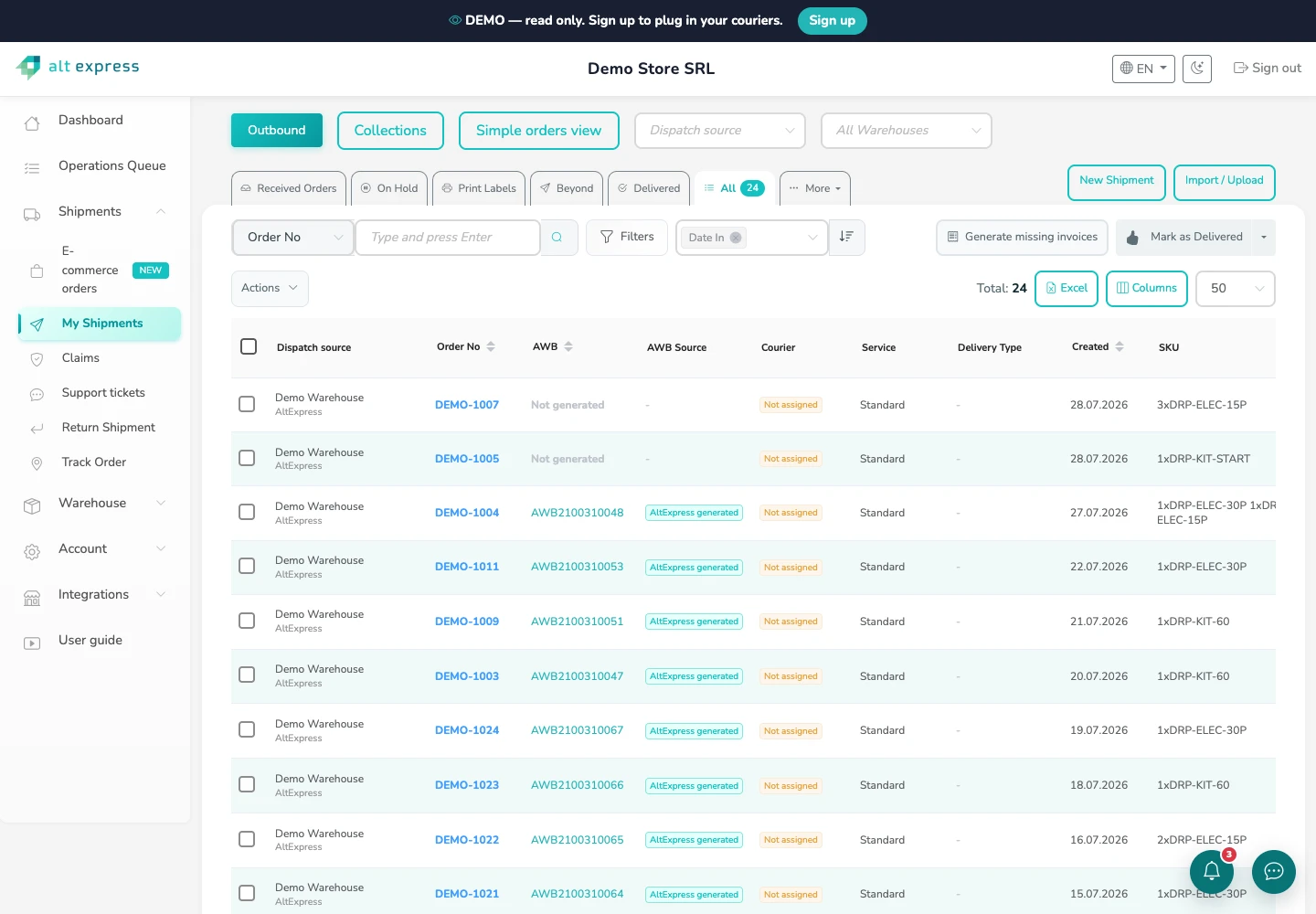
Orders, labels and delivery progress
Review order references, AWBs, SKUs and shipment stages in one list. Open the demo to explore the available controls.
 Europe
MyAltExpress · software
MyAltExpress connects your sales channels with shipping, warehouse work, returns and billing. Use it with AltExpress services or connect your own courier contracts.

MyAltExpress in practice
Explore the actual MyAltExpress interface: shipment records, warehouse stock and daily operations. These captures use the public demo account.
Swipe to explore the screenshot. Tap to open full size.
Review order references, AWBs, SKUs and shipment stages in one list. Open the demo to explore the available controls.
Swipe to explore the screenshot. Tap to open full size.
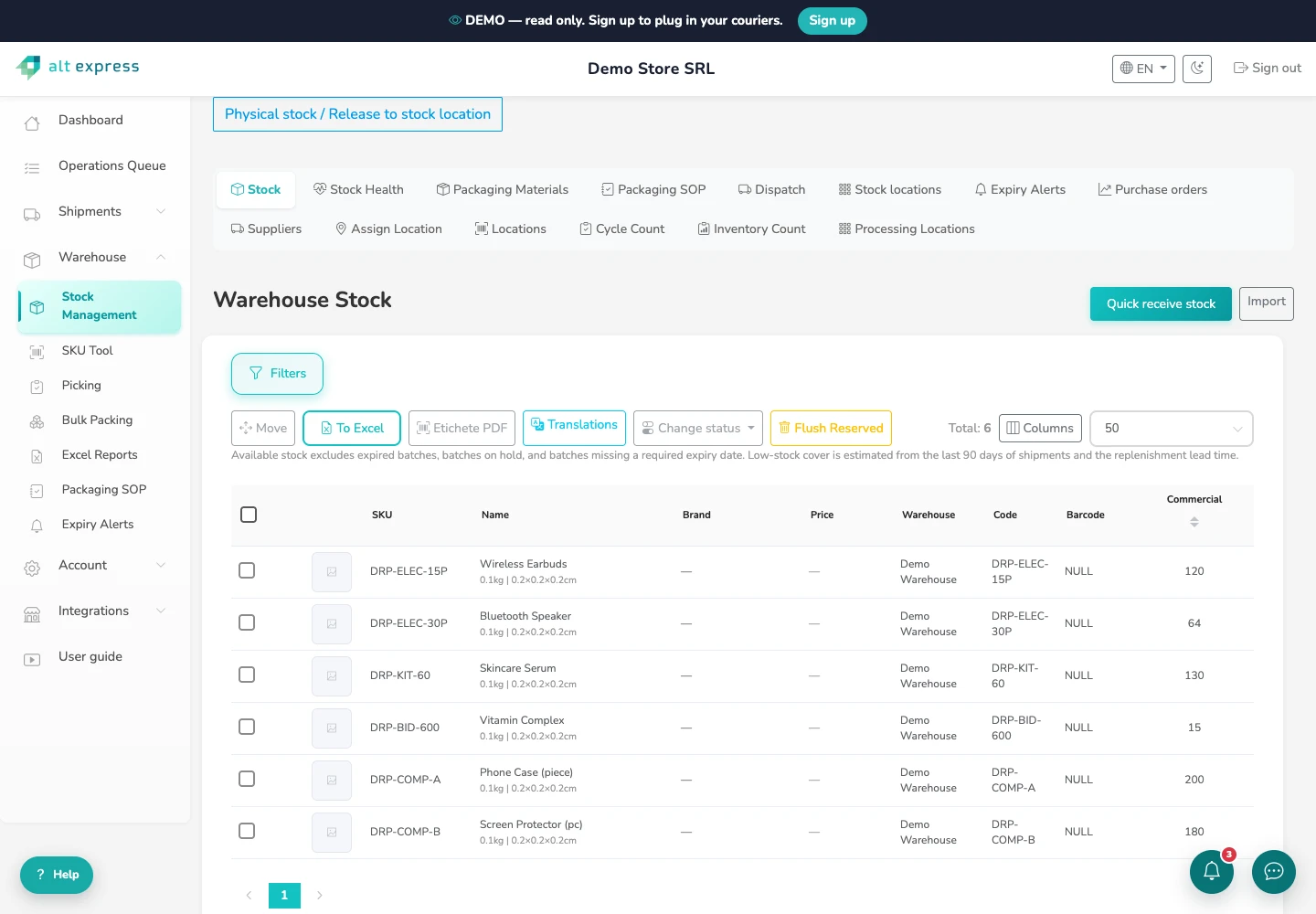
Review product records and warehouse stock, then follow the configured picking, packing and dispatch workflow.
Orders · warehouse · delivery
Follow the same order from receipt through warehouse work, delivery and returns. Payment, stock and delivery exceptions stay connected to the order.
Follow what happens after a sale, from the first import to the delivery, return and billing records.
Create and print AWBs, choose eligible courier services and follow shipment statuses. Keep delivery and cash-on-delivery information with the order.
Receive stock, pick by location and scan each SKU at packing. Keep packing photos, dispatch scans and courier handover records with the order.
See available and reserved stock by warehouse and location. Follow batches, expiry dates and stock movements, including components of bundled SKUs.
Bring orders from supported stores and marketplaces into the same workspace. Stock and AWB updates depend on each connector and its configuration.
Follow returns, delivery issues and claims alongside the order history. Give the team the shipment context it needs to investigate and respond.
Review invoices, COD payouts and billing attention alongside your orders. Dashboard reporting separates after-sales returns from courier returns; available functions follow your account setup.
Review order stages, courier performance and exceptions. Dashboard widgets bring packing workload, stock risk and billing attention into view.
Review stock health, replenishment estimates, incoming stock and supplier purchase orders. Forecasts depend on the available sales and stock history.
Connect custom systems using the documented endpoints and supported event flows. Review the API contract before building an integration.
Your existing tools
Open a setup guide for connector-specific requirements. Order import, stock updates, labels and invoice features vary by platform.
 WooCommerceSetup guide ↗
Order importStock syncAWB updates
 ShopifySetup guide ↗
Order importStock syncAWB updates
 PrestaShopSetup guide ↗
 GomagSetup guide ↗
Order importOptional stock syncAWB updates
 MerchantProSetup guide ↗
Order importOptional stock syncAWB updates
 eMAGSetup guide ↗
Order importeMAG courier AWBsOptional stock sync
 TrendyolSetup guide ↗
 CEL.ro
 OkaziiSetup guide ↗
Order importAWB updatesNo stock sync
 EasySales
 BaseLinker
 SmartBill
 FGO
 Oblio
Capabilities depend on permissions and configuration. Okazii imports orders and supports AWB updates but does not synchronize stock. eMAG’s FBE orders provide visibility rather than local warehouse fulfillment.
Ways to work with us
Prepay delivery, pay for the shipments you use, or run the software with your own courier contracts. The current offer defines the eligible services and terms.
Prepaid delivery
From13.00 RONper shipment
250 orders per month · Annual commitment
9,750.00 RON prepaid every 3 month(s)
Prepay an agreed monthly volume for a DPD domestic parcel rate with platform access included.
Pay for what you ship
From12.79 RONper shipment
From 2,500 shipments per month
DPD delivery up to 3.0 kg
Use published courier rates for your monthly volume and pay for the shipments you make.
Software is free for the first 6 months, then 0.25 RON per processed order. Delivery is charged separately.
Discuss this plan →Software subscription
From50.00 RONper month
100 orders per month
Your courier contracts; delivery billed separately
Manage orders, stock, labels and returns while keeping your own courier agreements.
Business delivery examples are for domestic Romania in RON, excluding VAT. Delivery rates include fuel and mandatory courier surcharges; COD, returns and other extras are separate. Software-only plans do not include delivery.
See current plans, courier rates and conditions ↗Our operation
AltExpress runs courier and e-fulfillment services from its warehouses in Bragadiru (Bucharest), Oradea and Zagreb, and works with partner warehouses across Europe. Start with your requirements and we build from there.
Questions
Have a question about your setup?
[email protected]
Yes. Technology-only plans let you connect supported courier contracts. The software subscription and your courier delivery charges are separate; check the supported services and terms before activation.
No. Capabilities vary. Okazii supports order import and AWB updates without stock sync. Other connectors may require linked products and stock-sync permissions. Use the setup guide for your channel.
Platform access is included in Membership. Pay-as-you-go introductory terms and technology-only subscriptions have their own conditions. The current Operations offer supplies the pricing and any introductory period.
Start with the REST API documentation and the endpoints relevant to your workflow. Confirm authentication, field requirements and supported updates, then test an order before enabling the full flow.
Business enquiries
Tell us your sales channels, order volumes and existing courier contracts. We will confirm the integrations and plan for your workflow.
Use this form for routes the calculator does not price, for fulfillment and for regular business volumes.